AI Voice Receptionist

A voice assistant that answers business calls, captures caller details, shares verified business information, books appointments in Google Calendar, and hands callers to a real person through Slack.

Platformn8n
Voice AIVapi
IntegrationsGoogle Calendar · Slack
TypeAI Voice Receptionist

The problem

Small service businesses lose work when nobody can pick up the phone. Owners and technicians are on the job, front-desk staff repeat the same answers about pricing and services, and caller details end up in notes, texts, or memory.

Booking adds more back-and-forth: checking the calendar, confirming a time, creating the event by hand, and hoping nothing is double-booked. When a caller needs a person, there is rarely a reliable way to pass along what was already discussed.

The solution

I built a voice receptionist with Vapi and n8n. Vapi handles the live conversation, and whenever the assistant needs to do something real, it calls a tool that sends a request to an n8n webhook.

n8n routes each request by action: save caller details, look up business information, check availability, create an appointment, or hand off to a human. Each branch returns a result the assistant can speak back to the caller during the same call. This case study uses a sample plumbing business.
Voice Agent & Workflow Routing

The first part of the system turns a spoken conversation into structured requests that n8n can act on, and returns answers the assistant can say out loud.

01
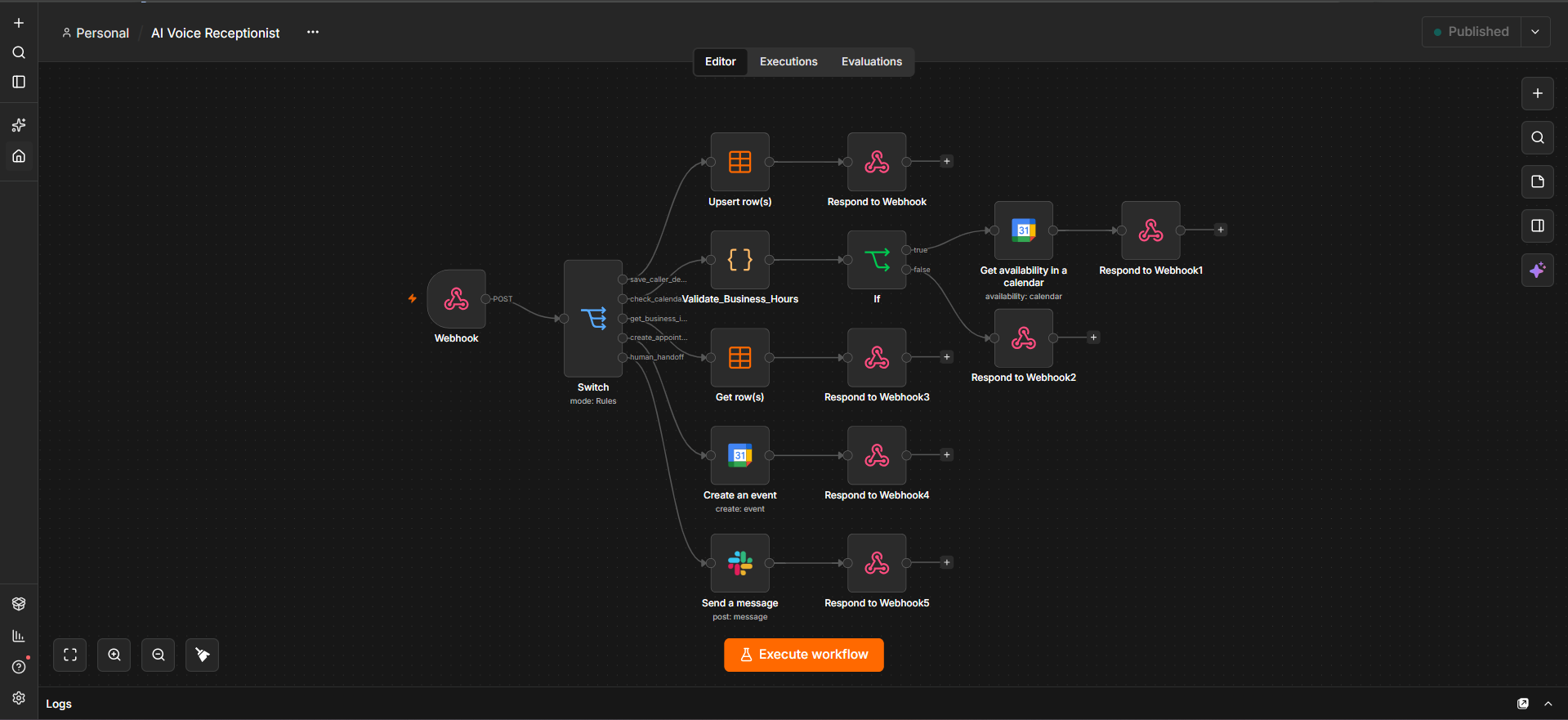
n8n workflow canvas with a webhook feeding a Switch node that routes caller details, business info, calendar availability, appointment creation, and human handoff to separate branches

Webhook-Based Voice Receptionist Architecture

Every tool in the Vapi assistant sends a POST request to one n8n webhook. A Switch node reads the action field and sends the request down one of five branches: save_caller_details, check_calendar_availability, get_business_info, create_appointment, or human_handoff.

Each branch ends in a Respond to Webhook node, so the assistant always gets a result back while the caller is still on the line.

02
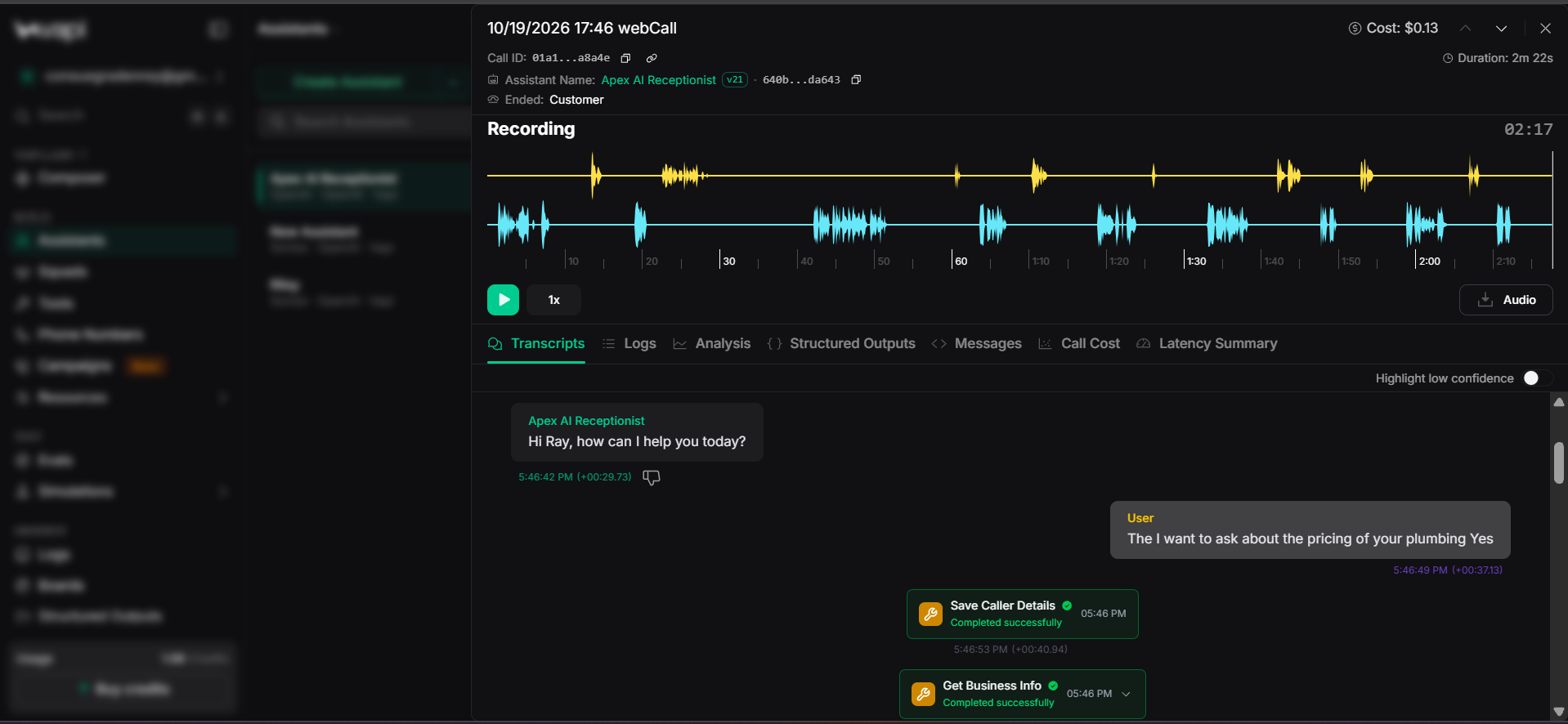
Vapi call log where the assistant saves caller details and looks up business info after a customer asks about plumbing pricing

Caller Details & Business Info Lookup

In this test call, the caller Ray asks about the pricing of the plumbing service. The assistant first runs Save Caller Details, then runs Get Business Info to look up the topic he asked about.

The caller details are saved with an append-or-update step, so a record can be updated instead of duplicated. The business information is read from a table that the business controls.

03
Vapi transcript where the assistant quotes plumbing prices from the business info lookup and asks for an appointment date and time

Answers Grounded in Business Data

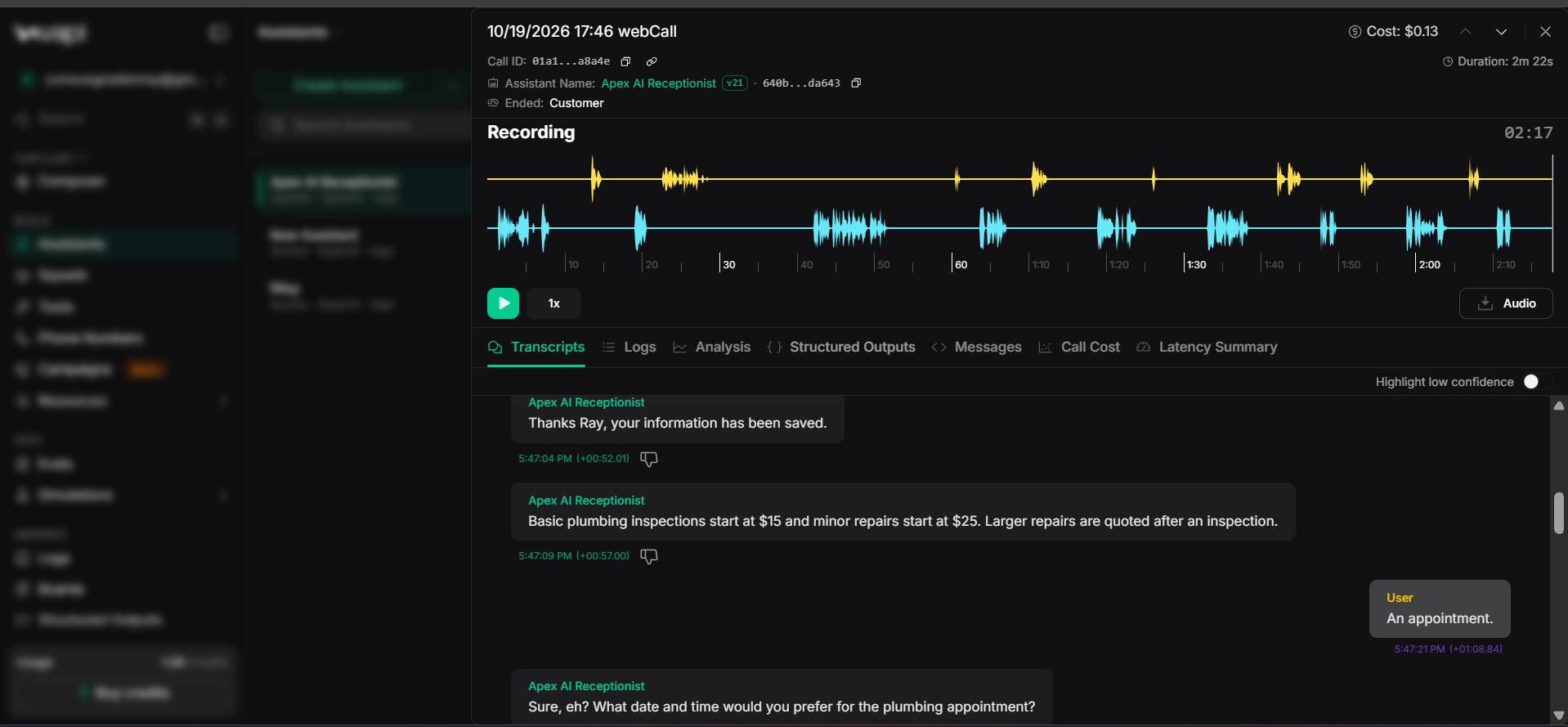
The pricing the assistant speaks, basic inspections from $15 and minor repairs from $25, with larger repairs quoted after an inspection, comes from the business information lookup instead of the model's guesses.

When Ray says he wants an appointment, the assistant asks which service he needs and what date and time he prefers.

Appointment Booking

Booking happens inside the same call, without anyone checking a calendar by hand.

04
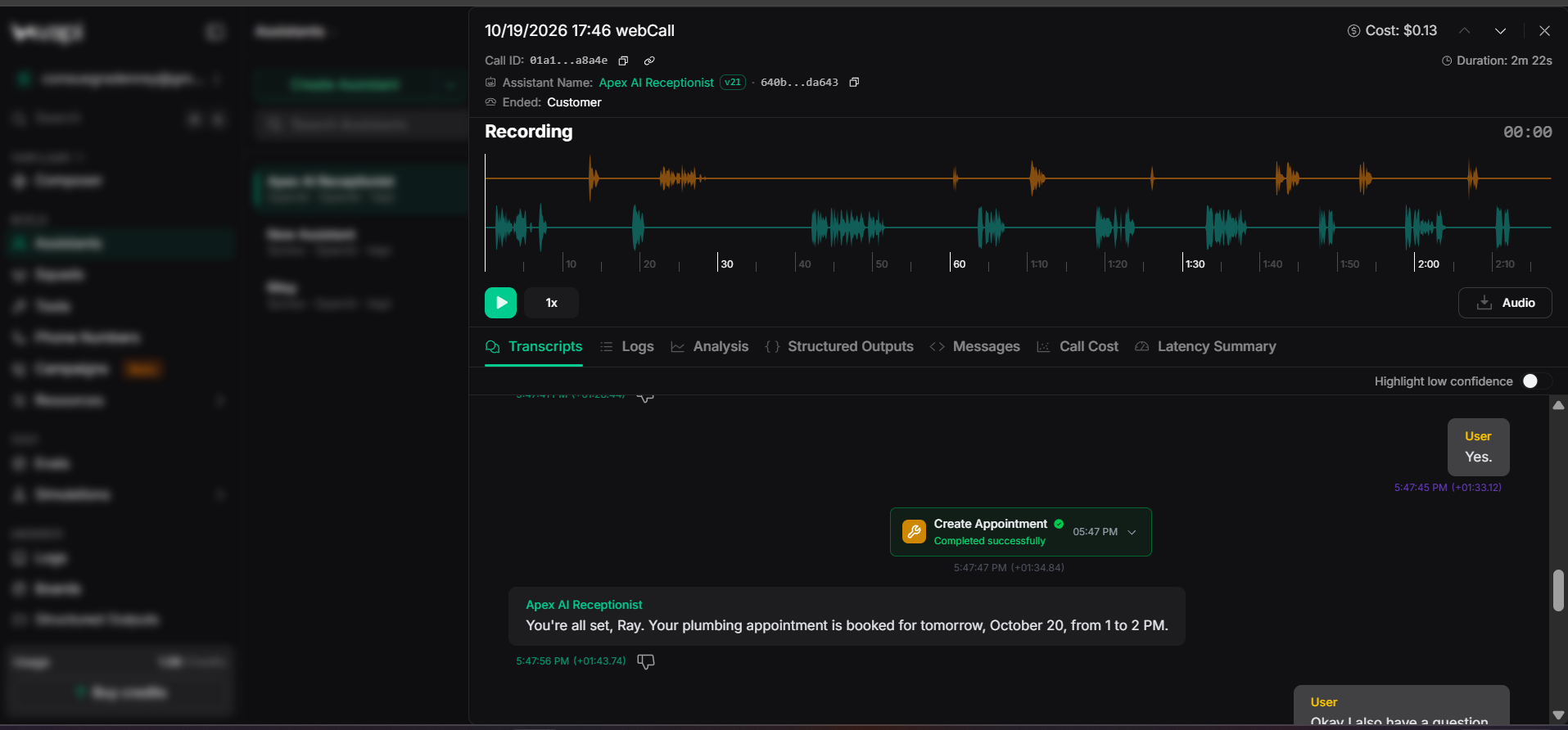
Vapi transcript showing the Create Appointment tool completing and the assistant confirming a booking for October 20 from 1 to 2 PM

Validated, Confirmed Booking

A code node first checks the requested time against business hours. If the time is valid, n8n checks Google Calendar for availability and the assistant reads the slot back to the caller.

Only after the caller says yes does Create Appointment run. The assistant then confirms the booking out loud: October 20, from 1 to 2 PM.

05
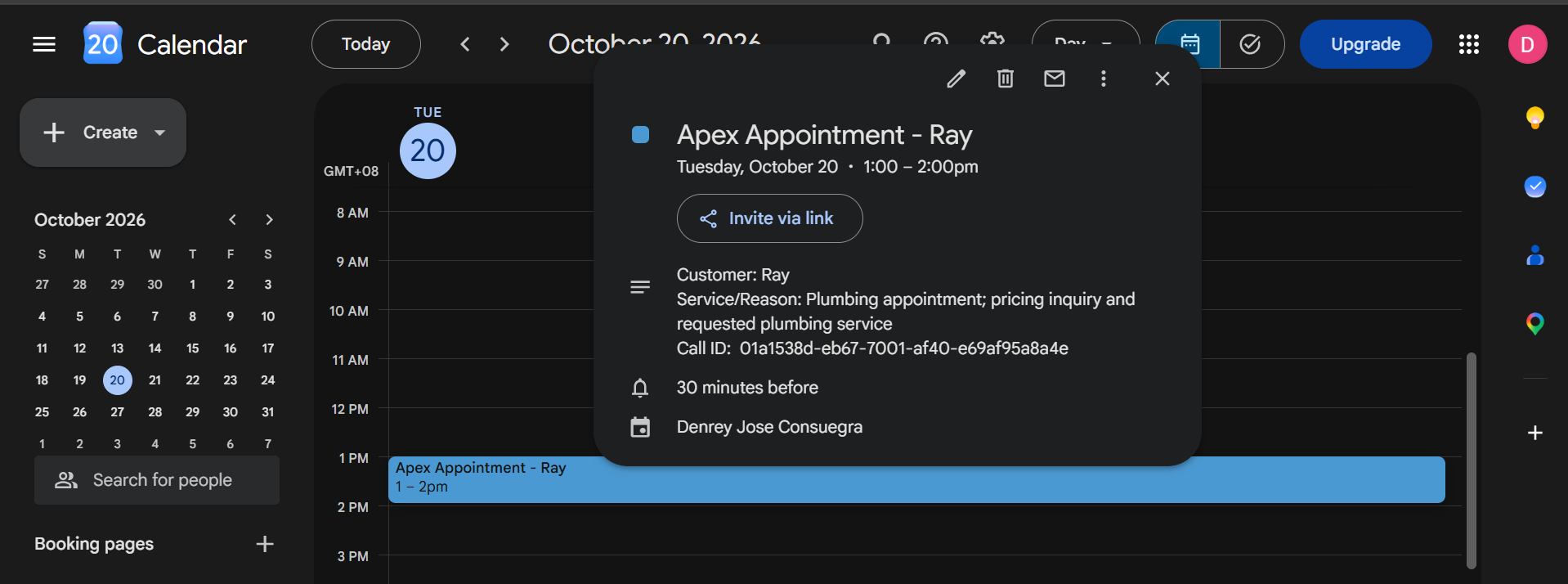
Google Calendar event named Apex Appointment - Ray on Tuesday, October 20 from 1 to 2 PM with customer name, service, and call ID in the description

Appointment Created in Google Calendar

The event appears on the calendar as Apex Appointment - Ray for Tuesday, October 20, 1:00 to 2:00 PM, with a 30-minute reminder.

The description carries the customer name, the service or reason, and the call ID, so every booking can be traced back to the conversation it came from.

Human Handoff & Slack Alert

Some callers need a person. The workflow makes that handoff immediate and gives the team the context they need.

06
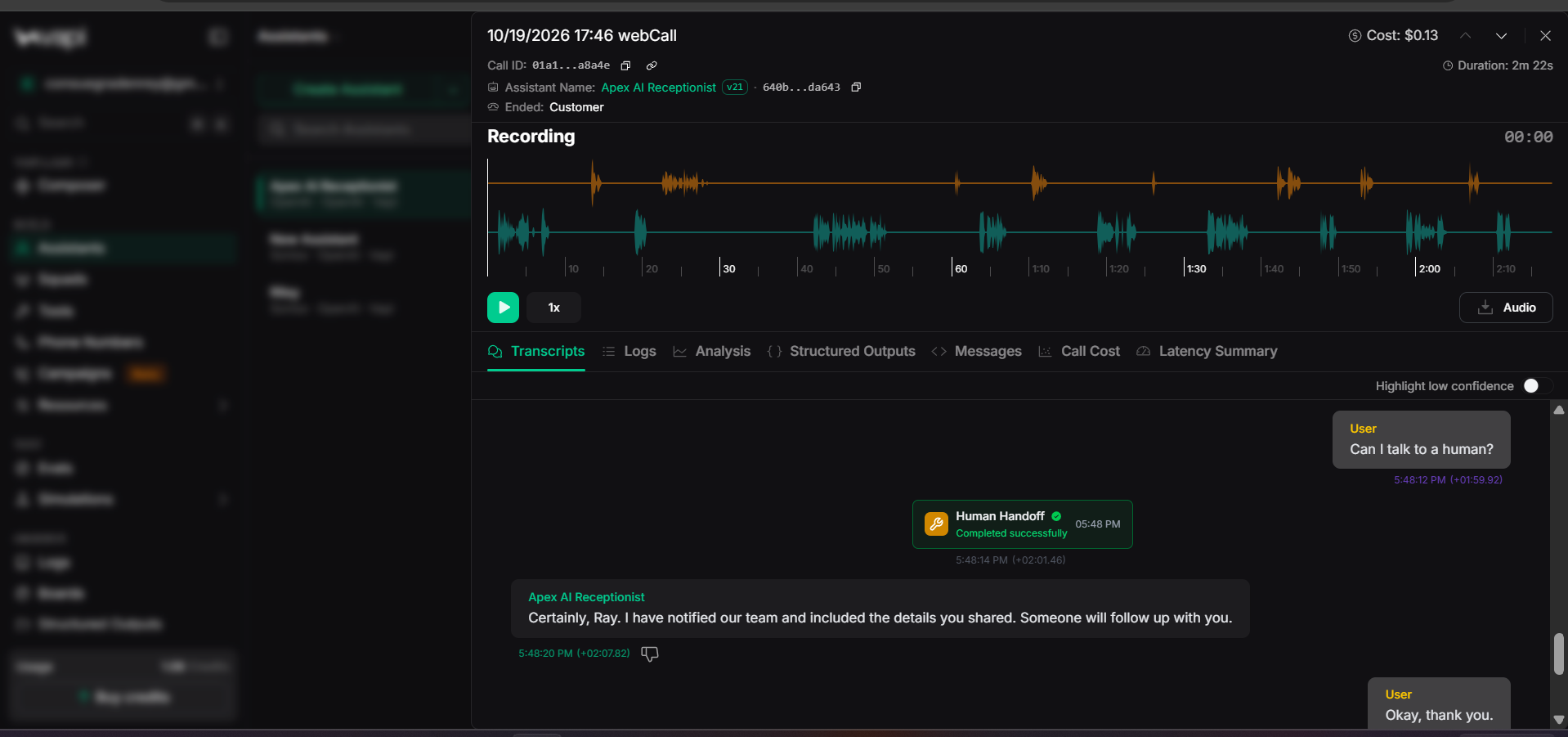
Vapi transcript where the caller asks to talk to a human and the Human Handoff tool completes successfully

Human Handoff on Request

When the caller asks, "Can I talk to a human?", the assistant runs the Human Handoff tool instead of trying to handle the request itself.

Once the tool completes, the assistant tells the caller that the team has been notified, that their details were shared, and that someone will follow up.

07
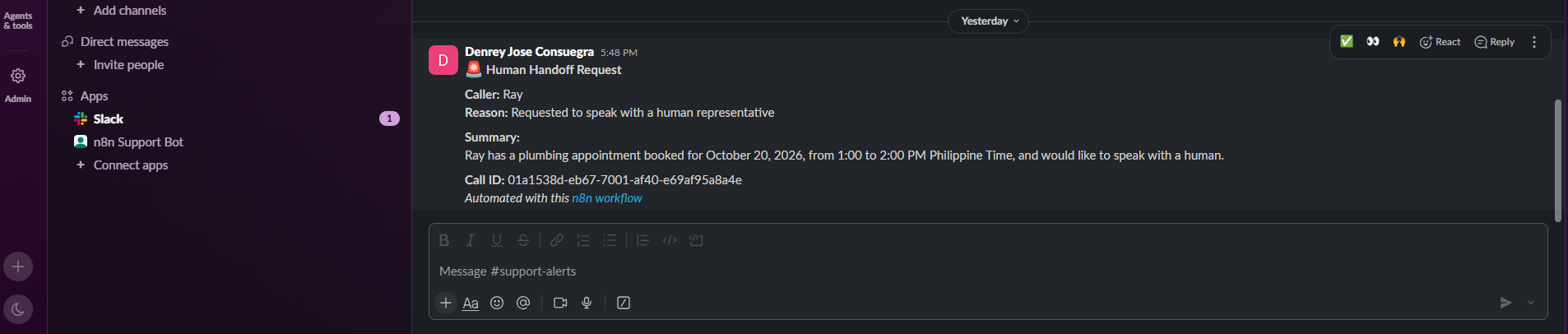
Slack message in the support-alerts channel titled Human Handoff Request with the caller, reason, summary, and call ID

Real-Time Slack Alert for the Team

n8n posts a Human Handoff Request to the support-alerts Slack channel with the caller's name, the reason, a short summary, and the call ID.

The summary includes what already happened on the call, such as the appointment that was booked, so the person who follows up does not have to ask the caller to start over.

One phone call connected to the work behind it.

01

Callers get an answer right away

The assistant responds during the call, so callers do not have to leave a message and wait for a callback.

02

Consistent business answers

Pricing and service details come from a business-controlled table instead of unsupported model guesses.

03

Booking without manual steps

Business-hours validation, availability checking, and calendar event creation happen in one conversation.

04

People step in when it matters

Requests for a human reach the team on Slack with the caller's details, reason, and summary attached.

Vapin8nWebhooksSwitch RoutingCode NodeGoogle Calendar APISlack APIVoice AI Tool Calling

Need an AI receptionist for your business?

I'm available for AI automation projects, voice agent builds, n8n workflows, and scheduling integrations.

Send me an email

Or contact me directly at consuegradenrey [at] gmail [dot] com